

Dashboard KPIs and Widgets
What this helps you do
Understand the Dashboard cards and widgets without assuming that every user sees the same totals.
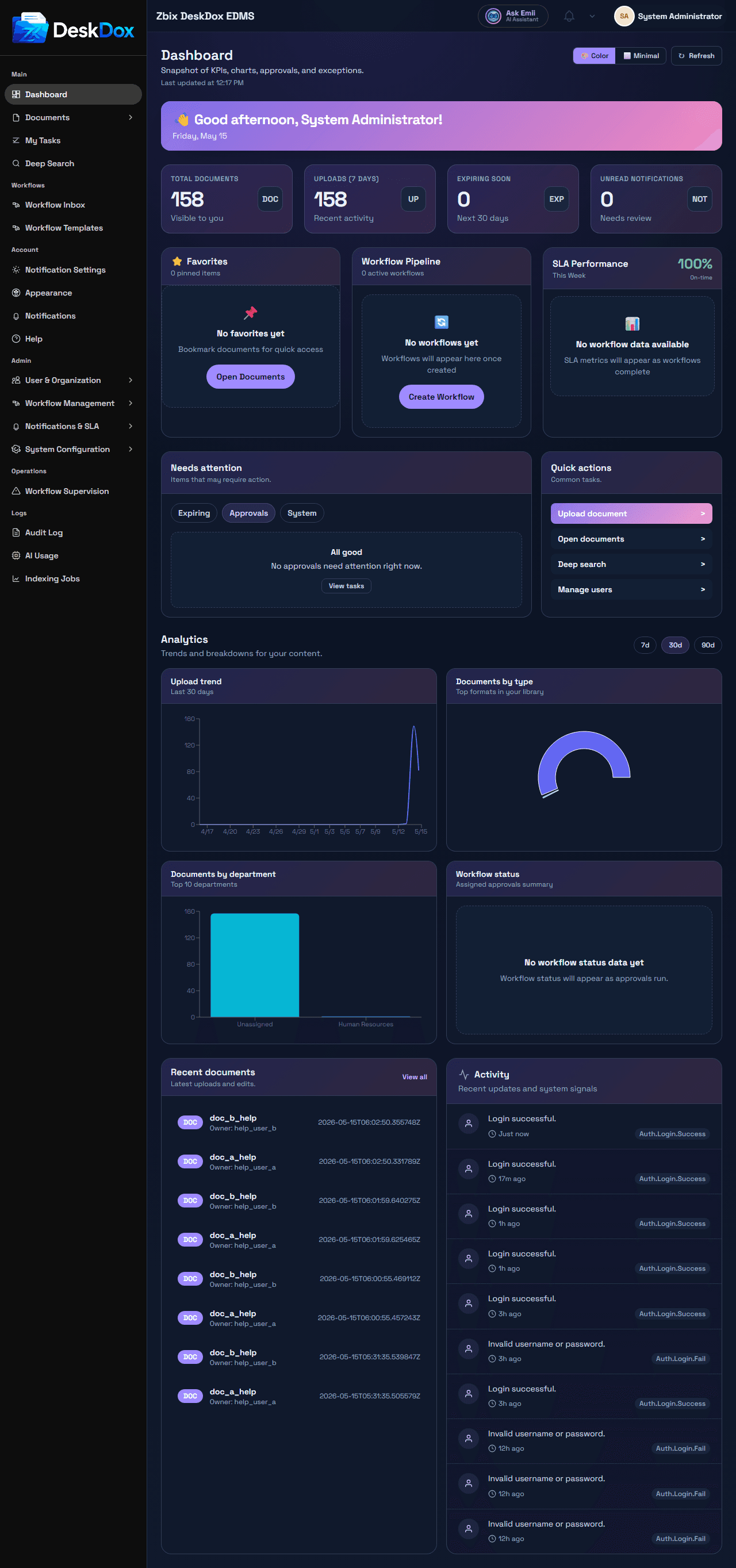
KPI cards
Total documentscounts documents visible to your account.Uploads (7 days)counts recently uploaded documents visible to your account.Expiring sooncounts visible documents approaching expiry.Unread notificationscounts unread notifications for your account.
These cards are clickable when your account has access to the related page. Document cards open document views, and the unread notification card opens notifications. If a card is not clickable in your environment, use the related menu page instead.
Widgets
Favorites lists favorite documents and can provide Open Documents. Workflow Pipeline shows active workflow status and can provide Create Workflow. SLA Performance shows workflow SLA metrics when workflow data is available. Needs-attention, quick-action, recent activity, or task panels may be visible depending on data, role, permission, and configuration.
Permission filtering
Dashboard figures are not global system totals for every user. They are filtered by access to documents, folders, workflows, notifications, department scope, and administrative permissions. This is why your Dashboard can show fewer documents or different workflow numbers than another user's Dashboard.
Refresh and count differences
Counts may lag briefly after uploads, workflow updates, notification reads, or lifecycle changes. If the Dashboard count differs from the document list, refresh the page, clear document filters, check expired or deleted views, and confirm you are comparing the same permission scope.